Build Beautiful App UIs Without Being a Designer — Google Stitch + Antigravity

If you've ever built an app and thought "the logic works great, but it looks terrible" — this one's for you.
Most developers, especially students, are strong on the backend and weak on UI. Getting the functionality right is satisfying. Getting it to look good? That's where hours disappear into tweaking CSS, picking colors, second-guessing layouts, and ultimately settling for something mediocre.
Google just changed that completely with two tools — Google Stitch and Google Antigravity — and when you combine them, the results are genuinely impressive.
#What Is Google Stitch?
Google Stitch is a design tool that turns plain text descriptions into complete UI designs for web and mobile apps. Think of it as "vibe designing" — the design equivalent of vibe coding.
You describe your app idea in plain English, and Stitch generates:
- Full wireframes for every screen
- Complete user journeys and navigation flows
- Editable designs you can annotate and modify
- Exportable code for the final designs
The key thing that sets Stitch apart from just generating a single mockup image is that it thinks in flows — it understands that real apps have multiple screens and designs all of them together, consistently.
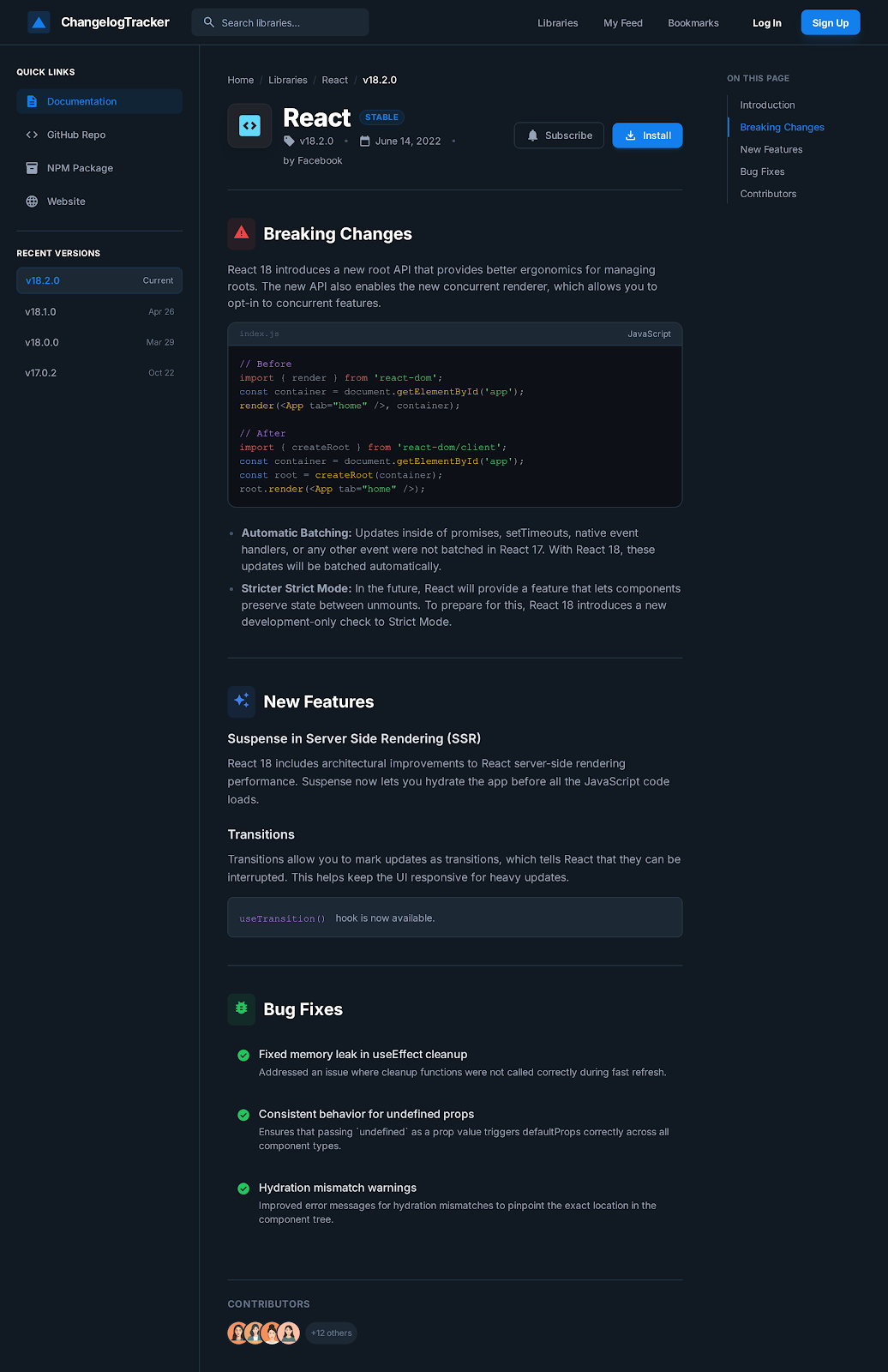 Google Stitch generating a full set of screens from a single prompt
#What Is Google Antigravity?
Google Antigravity is an agentic development platform — similar in spirit to Claude Code or Cursor, but built by Google. You describe what you want to build, and Antigravity writes real, working code for it.
Where it stands out is in its MCP (Model Context Protocol) support — it can connect to external tools and services to extend what it can do. And one of those tools is now Google Stitch.
#Why Combine Them?
Here's the problem with building UIs using just a coding agent: the agent knows your code, but it has to guess at good design. It doesn't know your color preferences, your target users, or what visual hierarchy makes sense for your specific app.
Stitch solves the design problem. Antigravity solves the engineering problem. Together, they solve both — without you having to be a designer or manually bridge the two.
The workflow looks like this:
| Step | Tool | What Happens |
|---|---|---|
| 1 | Antigravity | Builds initial working app |
| 2 | Stitch (via MCP) | Designs beautiful UI for the app |
| 3 | Antigravity | Implements the Stitch design into the app |
| 4 | You | Review, refine, ship |
#Setting It Up: 3 Steps
#Step 1: Add Google Stitch as an MCP Server in Antigravity
Open Google Antigravity and look for the agent window on the right side. Click the three dots (ellipses) and select MCP Servers. Search for "stitch" and click install.
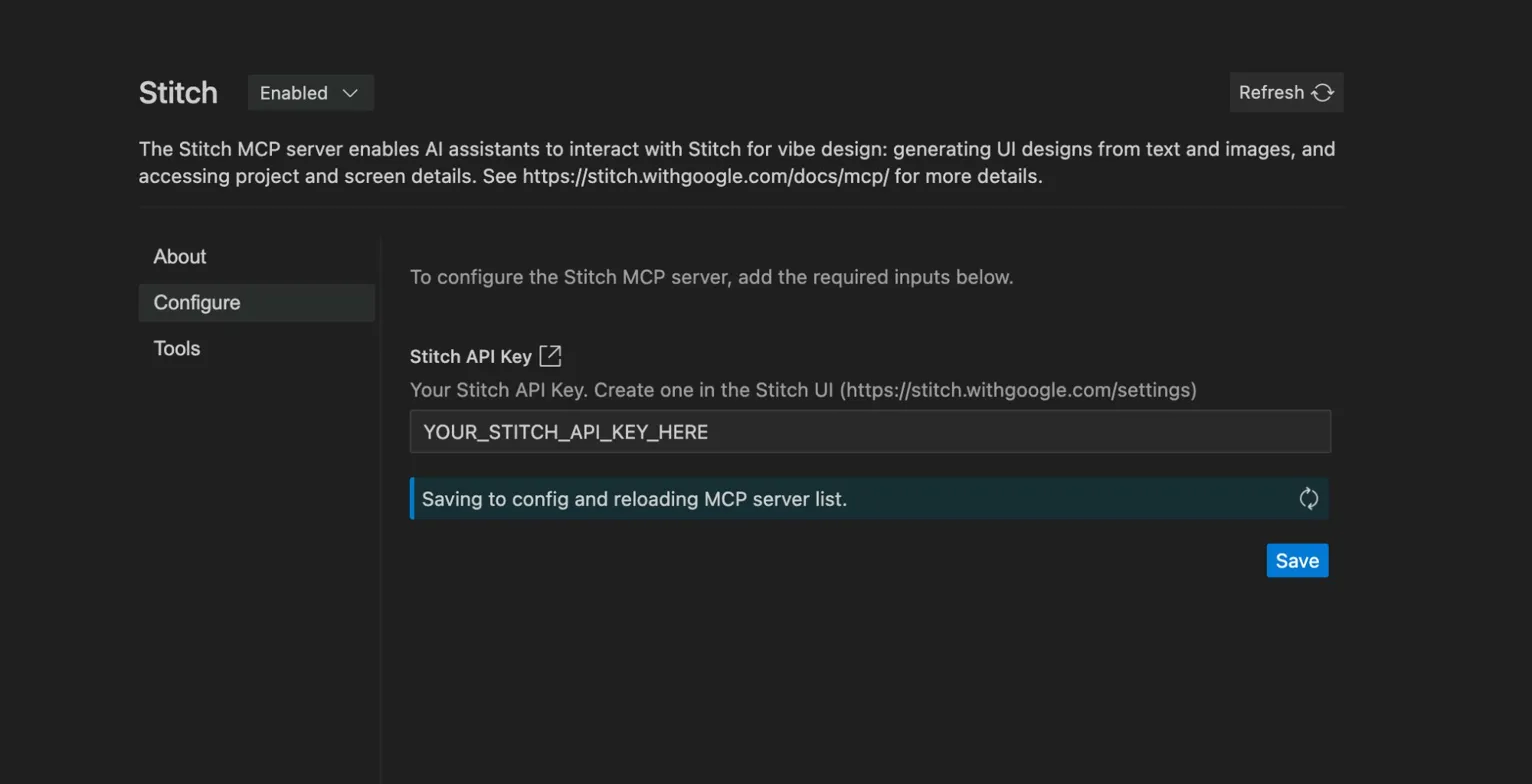 Installing the Stitch MCP server inside Google Antigravity
This is the same MCP pattern you may have seen with other AI tools — it's becoming the standard way AI agents connect to external capabilities.
#Step 2: Get a Stitch API Key
Head to stitch.withgoogle.com and sign in. Click your profile picture at the top right → Stitch Settings → Create API Key.
Copy the key and paste it into the MCP server configuration screen back in Antigravity.
That's it — the two tools are now connected.
#Step 3: Prompt Away
Now whenever you want Stitch to design something for your app, just mention it in your Antigravity prompt:
Use the Stitch MCP server to design a visual interface for this app
Antigravity will automatically pass your app's context — what it does, what screens exist, what the data looks like — to Stitch. This is much better than prompting Stitch directly, because Antigravity already knows your entire codebase and can write a far more detailed design brief than you'd write manually.
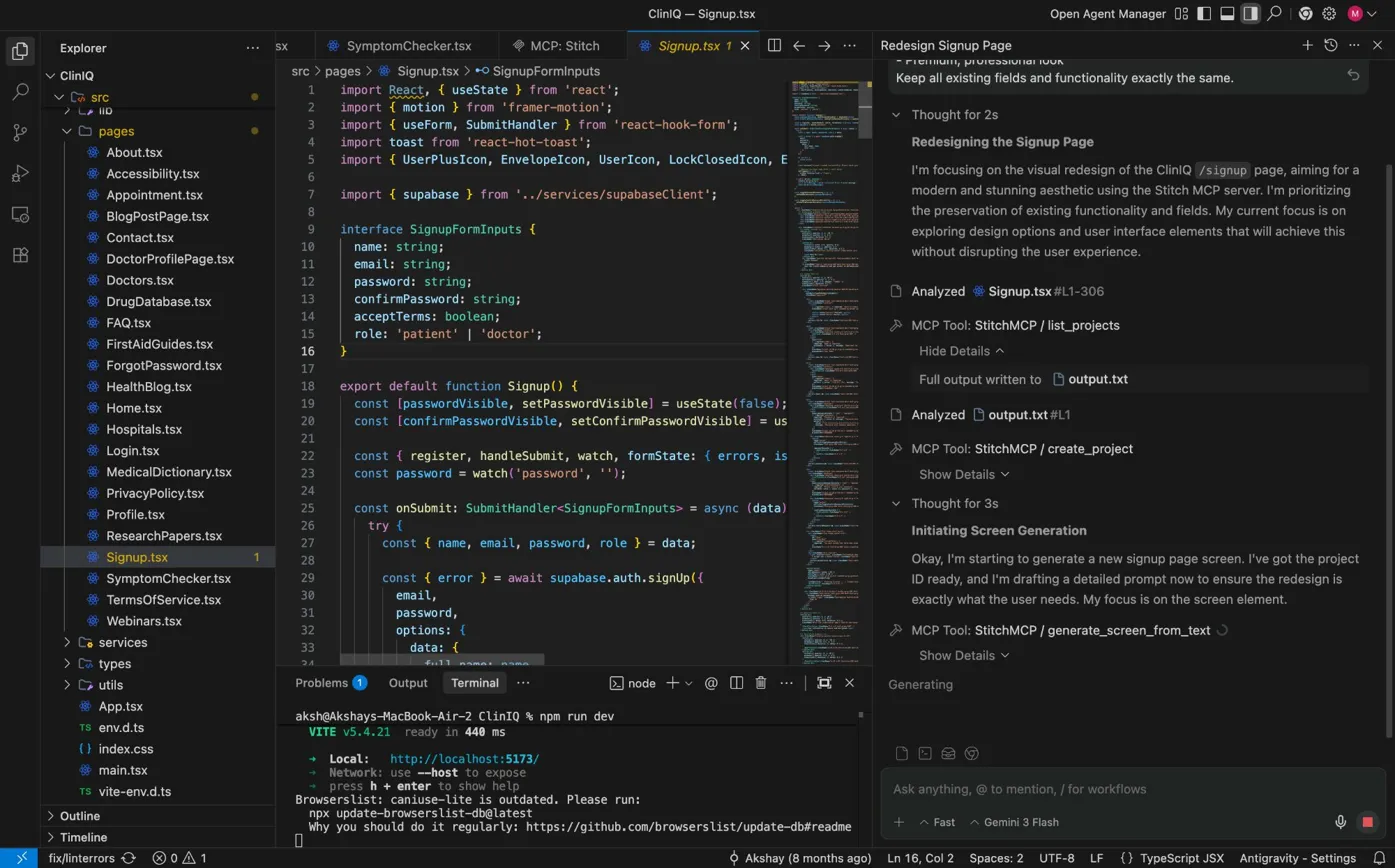 Antigravity analyzing the existing Signup.tsx and calling the Stitch MCP server to generate a redesigned UI
Antigravity automatically reads your existing code, passes the full context to Stitch, and starts generating. You can watch the entire process in real time on the right panel — every MCP tool call, every decision, completely transparent.
#A Real Example: From Ugly to Impressive
Here's what this looks like in practice. Say you've built a simple app that parses changelogs and shows you what's new with a library — functional, but visually plain.
Before Stitch — the default output from Antigravity looks something like this: white background, plain text, basic layout. It works, but it's not something you'd show in a portfolio or share with users confidently.
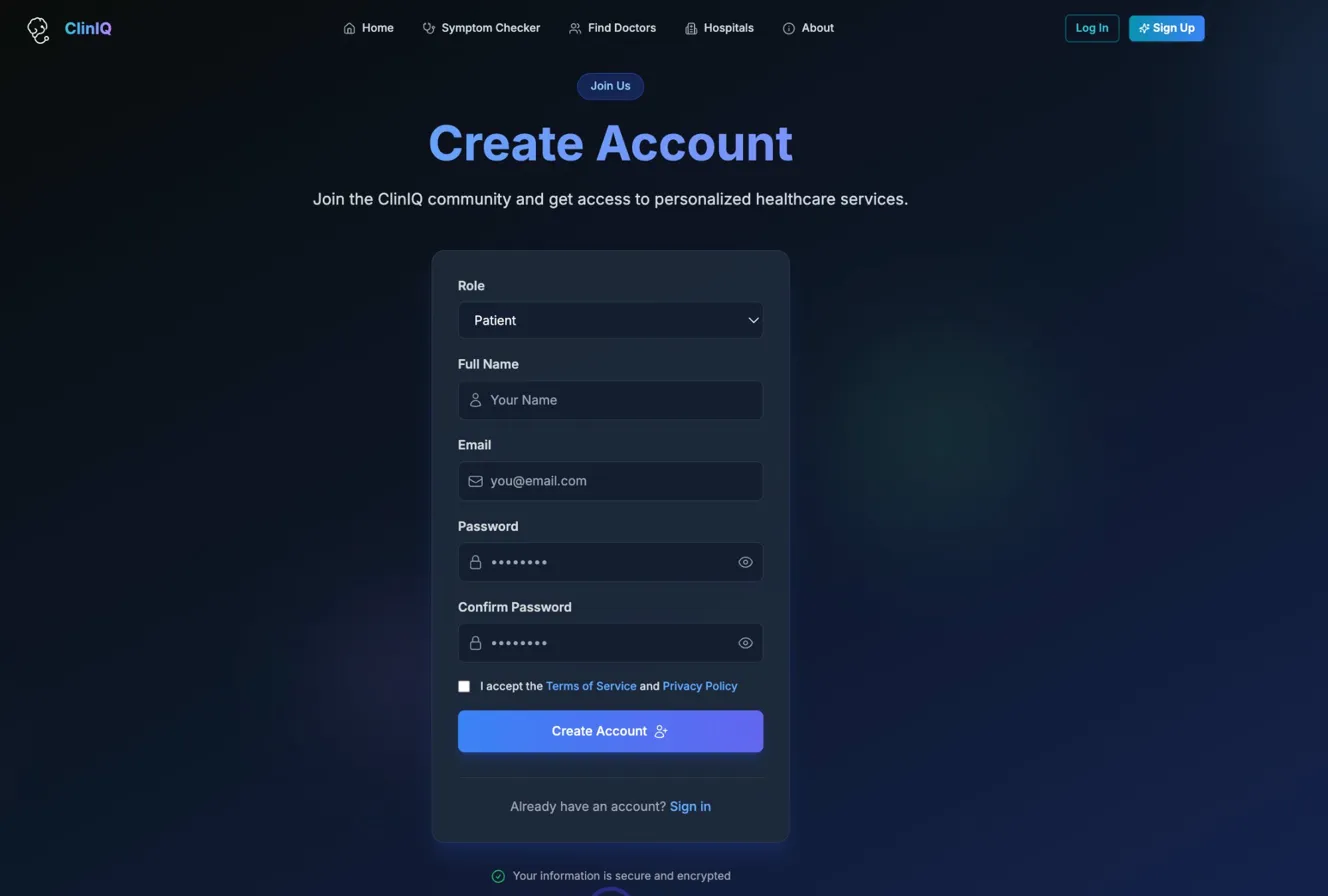 A functional but visually plain app before applying Stitch designs
After Stitch — Antigravity calls the Stitch MCP server, generates a proper design proposal, then implements it. Antigravity even switches to a better tech stack (React + Tailwind) if it determines that's more suited to rendering the design correctly.
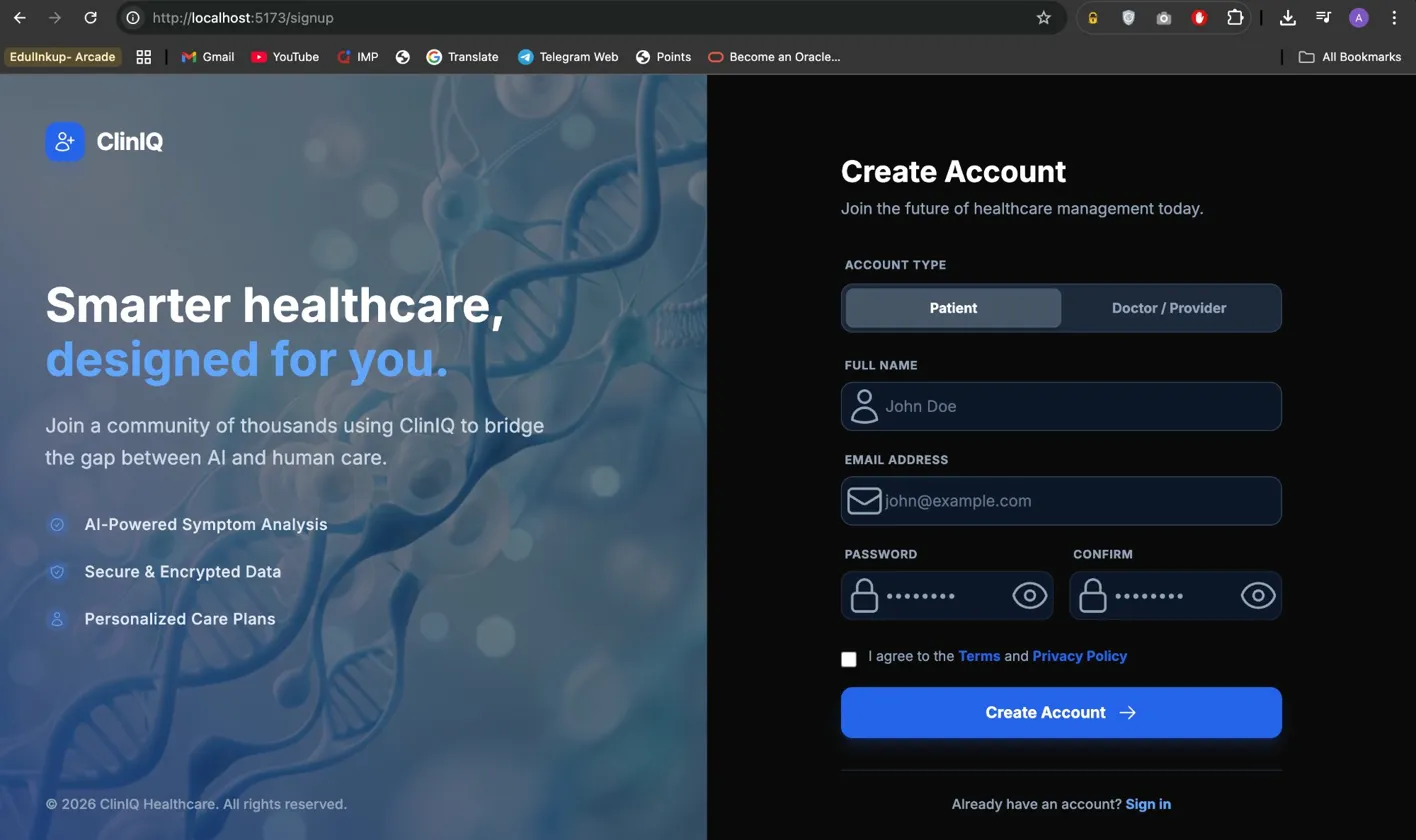 The same app after Antigravity implemented the Stitch-generated design
The difference is significant — and the key thing is you didn't design any of it manually.
#What Makes This Workflow So Efficient
A few things make this combination genuinely powerful rather than just a gimmick:
Stitch exports HTML/CSS files directly. When Antigravity pulls in a Stitch design, it gets actual code files — not just images to interpret. This means it doesn't have to guess how to translate the design into code. The design and the implementation stay in sync.
Antigravity writes the design brief automatically. When you ask Antigravity to use the Stitch MCP server, it generates the prompt to Stitch based on your app's actual functionality. This produces much more accurate designs than if you described your app to Stitch yourself from scratch.
You stay in one place. The entire workflow — coding, designing, implementing — happens inside Antigravity. You're not switching between four different tools and manually copying things across.
#Should You Use This?
Yes, if:
- You're a developer who struggles with UI design
- You're building a portfolio project and want it to look polished
- You want to prototype and demo an app quickly without hiring a designer
- You already use Google Antigravity for coding
Maybe not if:
- You have a dedicated designer on your team
- You need highly custom, brand-specific design that requires precise control
- You're working on a project that doesn't use web or mobile UI at all
#Honest Take
This isn't magic. The designs Stitch generates are good — genuinely good — but they still benefit from your review and feedback. Think of it as having a junior designer who produces solid first drafts that you then refine, rather than a senior designer who nails it perfectly on the first try.
But for students and solo developers? That junior designer would have cost you hours of struggling with CSS or money hiring someone on Fiverr. Getting a solid, functional, good-looking UI in a few prompts is a real productivity win.
The MCP integration is what makes this feel like a glimpse into how AI-powered development will work going forward — specialized tools connected together, each doing what it does best, coordinated by an agent that understands your full context.
#Final Thoughts
First impressions matter in software just as much as anywhere else. A well-designed UI signals effort, professionalism, and care — even if the underlying logic is identical to a plain-looking app.
Google Stitch + Antigravity removes the biggest excuse developers have for shipping ugly apps: "I'm not a designer." Now you don't need to be.
Have you tried Google Stitch or Antigravity? Drop a comment below — would love to hear what you built with it.
Related Articles
Akshay Kumar is a Full Stack Developer dedicated to building scalable web applications and AI-driven products. As an experienced Full Stack Developer, he specializes in the MERN stack and cloud innovations, sharing deep technical insights to help others master modern full stack development.
Stay Ahead of the Curve
Join 5,000+ developers receiving the latest tutorials, study guides, and internship opportunities directly in their inbox.
No spam, ever. Unsubscribe anytime.
Comments (0)
Log in to join the discussion